

CMMS Features

How can we help you?
Maintenance Tracking & Asset Management
Software for paperless maintenance, fewer surprises, higher productivity
MaintiMizer keeps the work orders, the schedule, the machines, the parts and the orders in one place. You see what needs doing, who will do it, what you need, and what happened the last time.

Your Machines' Maintenance History Builds as Your Team Completes Their Tasks
MaintiMizer is built around the maintenance work you already do. Each module of MaintiMizer is designed to solve a real problem on the floor: fixing machines, scheduling labor, purchasing parts, and managing inventory.
FIVE MODULES IN ONE SYSTEM
Your full process, from tracking maintenance to ordering parts takes place in one centralized CMMS. Manage WOs, document maintenance activity, track costs, and more with MaintiMizer.
Here's how the process works in MaintiMizer:
WORK ORDER MANAGEMENT
Create, assign and track work orders, and finish the job
The work order is the center of your maintenance tracking software. It holds the job from the moment someone reports a problem until the machine is back running and the work order is complete.
Key work order management features
MaintiMizer work orders answer these questions:
How do we make sure maintenance knows when something breaks?
Anyone can send in a work request from a form or the mobile app. People outside maintenance can scan a QR code to alert the maintenance team. A supervisor turns the request into a work order with a number, a priority, and a technician assigned. No more lost jobs on sticky notes!
How do I find everything I need to complete a work order?
The work order shows the machine, the step-by-step procedure (SOP), safety and start-up notes, the parts you will need, and any drawings or files. You’ll need fewer trips back to the shop.
What information can I add when closing a work order in MaintiMizer?
Enter your time, the parts you used, what you found and what you did, at a desk or on the mobile app. Sign it off. The next technician who works on that machine can read the full maintenance history.
How do I find any work order and see the related costs?
In MaintiMizer, search every work order by any field. See the parts, labor and maintenance costs behind them, with totals, and send the list to Excel or the printer.
PREVENTIVE MAINTENANCE SCHEDULING
Plan the maintenance schedule before the week begins.
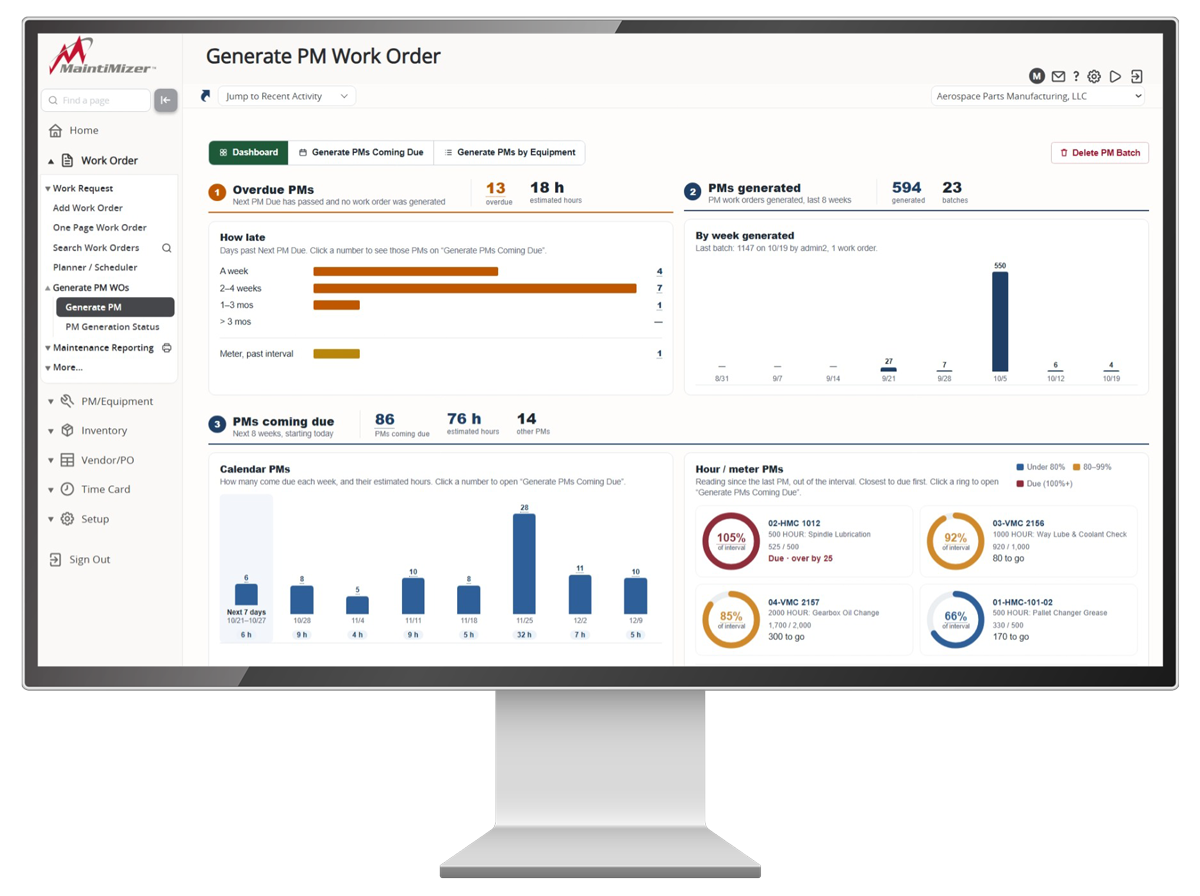
Turn a backlog of open work into a weekly maintenance schedule that fits your team. PMs automatically schedule, by date or by meter reading, so your maintenance strategies stay on track. You can see the workload coming through the pipeline and make necessary adjustments.

Key preventive maintenance scheduling features
MaintiMizer PM scheduling answers these questions:
What should maintenance work on this week?
See the open work orders with priority, due date and estimated hours, and pick what goes into next week’s maintenance schedule.
Which technicians are free, and when?
See each technician’s availability for the week, with holidays, site closures and days off already taken out, so nobody is overbooked. Easily reassign technicians and availability changes with MaintiMizer’s “Smart Reassign” button.
What technician can work on which work order?
MaintiMizer’s Smart Fill puts open work orders into the week by priority and due date, matched to each person’s craft and free hours. Drag anything to move it.
How do I keep my preventive maintenance work orders organized?
With MaintiMizer, preventive maintenance work orders automatically appear on the work schedule. Manage PMs by the calendar or by run-hour meter readings, or let technicians complete them on the mobile app.
Is next month’s PM workload too heavy?
Look at the PM workload by week and craft before it arrives, then adjust preventive maintenance tasks to even it out.
What parts will we need to use and order in the next few weeks?
Forecast the parts for upcoming PMs so they are on the shelf when work starts. MaintiMizer keeps part manufacturer, part number, costs and more for easy reference.
EQUIPMENT AND ASSET MANANGEMENT
Every asset’s maintenance history in one place
Every pump, press, motor and air handler gets its own asset record. Over time it becomes the machine’s logbook: what maintenance was done, the costs involved, and what parts were used.

Key asset management features
MaintiMizer asset management answers these questions:
What maintenance has been done to this machine?
Pull up any asset and see every assigned work order, the parts that went into it, and its maintenance costs. Track asset performance and spot the machine that keeps breaking.
Is this machine still under warranty?
Check the warranty in MaintiMizer before you pay for repairs or parts. The problem could be a covered issue.
What exact parts do we use on this machine?
Each asset keeps a list of the parts that go on it, so you can find the right belt, filter or bearing without digging through a manual.
Where is my equipment located, and what is it part of?
Record the location of your asset by including building, room and area information in MaintiMizer. Build your equipment hierarchy by putting machines under the line or system they belong to. You can look at the whole line or at one motor as needed.
How do I stay ahead of scheduling preventive maintenance tasks?
Enter each machine’s meter readings or bring PMs in from a spreadsheet. From there, related preventive maintenance tasks will automatically generate and come due on their own.
INVENTORY MANAGEMENT AND SPARE PARTS
The right spare part, on the shelf, when you need it
Inventory management shows what you have, where it is and when to order more. Parts taken for a job are charged to that work order, so maintenance costs follow the machine.

Key MaintiMizer inventory management features
MaintiMizer inventory management answers these questions:
Do we have what we need, and where is it?
Search by part number, name or description. See every stockroom and bin that holds it, and how many are there.
How do I document what parts I used for a work order?
Withdraw parts against a work order. The count on the shelf goes down and the cost lands on the right asset.
Can we automatically restock parts in MaintiMizer?
Set minimum and maximum levels. Parts that drop low show up for reorder, and a purchase order can be made from that list.
What substitute parts are available right now?
Look up similar or substitute parts so the machine is not down waiting for one part number.
Does MaintiMizer manage bar codes for parts?
Print barcode labels for parts and bins, so the next person finds the part as fast as you did.
Who has the maintenance tool for my work order?
Check tools out and back in. Know who has the torque wrench and when it went out.
PURCHASE ORDERS AND REQUISITIONS
Order the parts that maintenance needs and know when they are available
MaintiMizer integrates with ERP software so you can send a purchase order for what you need. Get your purchase approved, order it and mark it as received, all inside MaintiMizer. Every step ties back to the work order and the asset it was for.

Key MaintiMizer maintenance purchasing features
MaintiMizer purchase orders answers these questions:
Who do I send my request to so I can complete this purchase?
Fill out a requisition for the part or service you need. It goes for approval, then becomes a purchase order. No more chasing someone down to place an order.
Have my maintenance parts arrived yet?
See open orders and the ones that are late. When the box arrives, receive it against the PO and it goes into the stockroom, ready for the work order that was waiting on it.
Does MaintiMizer help with standardized parts labels?
Print part labels while you receive inventory, so new stock is easy to find on the appropriate shelf.
Does the invoice match what was delivered?
Match the vendor’s invoice to what was actually received before it gets paid. Short shipments and price changes stand out.
Where did we buy this part from the last time?
MaintiMizer is a centralized digital hub to store vendors, past orders, and what you previously paid, so reordering is simple.
See How MaintiMizer Can Work for You
Contact us and we'll talk through your specific setup and processes.
MaintiMizer has been innovating maintenance tracking solutions for over 40 years. We'll find a solution for you!